

AI tools can generate emails, summarize documents, and suggest ways to improve a workflow. The problem is that someone still has to put those suggestions into practice.
Viktor takes a different approach. It positions itself as an AI employee that works inside Slack and Microsoft Teams, connects with business applications, and carries tasks through to deliverables such as reports, code, updates, and automations.
That could be useful for a small team juggling sales, marketing, operations, and reporting. But there are practical questions to answer before adding an autonomous AI system to your workflow: How much does it cost? How quickly can credits be consumed? What permissions does it need? And how much human supervision is still necessary?
This Viktor review examines the advertised features, published pricing, security documentation, and available customer feedback. It does not claim independent hands-on testing, so product capabilities and company statements are distinguished from verified performance.
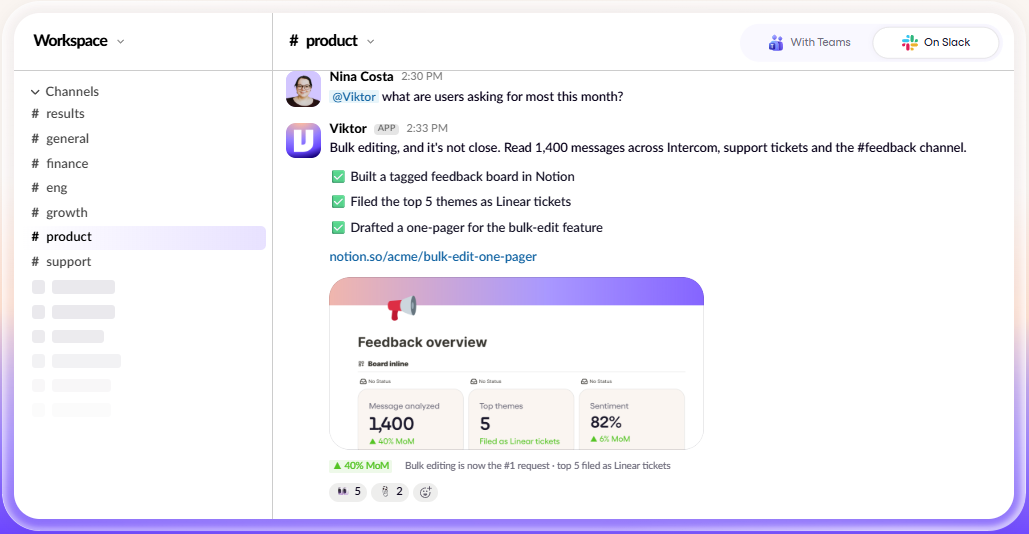
Viktor is worth evaluating if your team already works in Slack or Microsoft Teams and regularly spends time moving information between business applications. Its core proposition is to handle multi-step tasks rather than stop after generating an answer.
The biggest potential benefit is workflow execution. Instead of asking an AI assistant to draft a report and then manually updating other systems, you can assign a task that involves research, data retrieval, document creation, or connected-app updates.
The trade-off is that an AI system with access to business tools introduces additional costs and operational risks. Credit consumption depends on the work performed, and connected applications may expose sensitive information or allow consequential actions if permissions are too broad.
Viktor may be a good fit if you:
Run a small or growing business with repetitive operational tasks.
Use Slack or Microsoft Teams as a central workspace.
Need automation across several business applications.
Want reports, spreadsheets, code, or updated records rather than text-only responses.
Can review outputs and supervise actions involving customers, money, or production systems.
You may want another tool if you:
Mainly need writing, brainstorming, or basic question answering.
Prefer predictable per-user pricing over usage-based credits.
Need an assistant that primarily operates outside Slack and Teams.
Cannot allow an AI system to connect to important company tools.
Need guaranteed accuracy without human review.
Verdict: Viktor has a compelling use case for teams that need cross-tool task execution. Whether it is worth paying for depends on the value of the workflows it completes, the credits they consume, and the level of oversight your team requires.
CTA: Try Viktor’s free credits on one clearly defined workflow before deciding whether to upgrade.
Viktor is a business-focused AI assistant marketed as an “AI employee.” It operates through Slack and Microsoft Teams and can connect to external tools so it can work with business data and take actions, subject to the access and controls configured for it.
The difference from a conventional chatbot is the intended workflow.
A typical chatbot might help you write a customer follow-up email. An action-oriented AI assistant may also retrieve the relevant CRM record, prepare the message, update a task, and ask for approval before sending it.
Viktor advertises integrations with tools used in sales, marketing, operations, engineering, and finance. Its examples include applications such as HubSpot, Notion, Google Drive, Linear, and Stripe, alongside a broader catalogue of integrations.
The practical value is not simply that Viktor can connect to many services. It is whether it can complete a specific workflow reliably, with appropriate permissions and less manual work than your existing process.
Viktor is designed to handle tasks that involve several steps or systems. Examples include compiling reports, researching information, updating CRM records, preparing follow-ups, and coordinating routine operations.
For a small business, a useful test might be preparing a weekly sales report from existing CRM data. A marketing team could test whether it can compile campaign results into a spreadsheet and flag unusual changes.
The important distinction is between an advertised capability and a result your team has verified. Before relying on Viktor for a recurring task, check the completeness of its output, the accuracy of its data, and how much correction is required.
Viktor is designed to fit into collaboration tools that teams already use. Instead of switching to a separate AI application for every request, employees can assign work through their existing team workspace.
This can reduce friction when a task starts with a conversation or a request from a colleague.
However, an assistant embedded in a team workspace is not automatically suitable for every department. Your team should define which channels it can access, which employees can invoke it, and which actions require approval.
Viktor advertises support for more than 3,200 tools and integrations. The usefulness of that breadth depends on your existing technology stack and the actions supported by each integration.
Before subscribing, identify the specific systems that matter most. For example:
Sales: CRM updates, lead research, and follow-up preparation.
Marketing: campaign reporting, competitor research, and content operations.
Operations: recurring reports, data consolidation, and task coordination.
Engineering: code-related tasks, issue tracking, and workflow support.
Finance: information gathering and reporting, with strict approval controls for financial actions.
Do not assume that every integration offers the same depth of functionality. Confirm whether Viktor can read data, create records, edit information, or perform the precise action your workflow requires.
Viktor's product positioning emphasizes completed work, including documents, reports, spreadsheets, web applications, and code.
This can be more valuable than a generic AI response when the task requires a usable artifact. But a deliverable is not necessarily correct simply because it looks complete.
For important outputs, verify the source data, formulas, links, assumptions, and any changes made to connected systems. Code and production changes deserve particular scrutiny.
Recurring automation is another advertised use case. A team may want a regular performance summary, an operations briefing, or a report delivered on a schedule.
Scheduled workflows can save time when the process is stable and the output is easy to validate. They can also multiply errors if the underlying data changes or a connected application stops working.
Start with a low-risk recurring task. Review several runs before allowing the workflow to operate with less supervision.
Viktor's published pricing page lists a free option with up to $100 in credits, a Team plan shown at $100 per month, and custom Enterprise pricing. Pricing and plan details can change, so confirm the current offer before subscribing.
| Plan | Published price | Main details |
|---|---|---|
| Free | $0 | Up to $100 in credits; no credit card required |
| Team | $100/month | 40,000 shared monthly credits |
| Enterprise | Custom | Enterprise controls, volume pricing, and tailored support |
The free option is positioned as a way to try the platform without entering a credit card. It includes access to the listed features and integrations, with usage limited by the available credits.
The Team plan pools credits across the workspace rather than assigning a separate fixed allowance to every user. The pricing page also lists top-ups, optional automatic top-ups with a spending cap, and rollover of unused monthly credits.
Enterprise pricing is intended for organizations that need additional controls, volume pricing, invoicing arrangements, security review support, and tailored onboarding.
Credits represent usage rather than simply counting the number of messages sent. Viktor explains that costs depend on the work performed, including the model usage involved in completing tasks.
The pricing page gives indicative examples:
Quick tasks: approximately 100–300 credits.
More complex workflows: approximately 500–1,500 credits.
Larger projects: approximately 2,000–5,000 credits.
These are examples published by the company, not guaranteed costs for every similar task. A longer conversation, repeated context, complex instructions, or scheduled automation may consume more credits than a simple request.
Viktor also says it uses caching to reduce repeated work. The actual savings will depend on your workflows and usage patterns.
The monthly subscription price alone does not answer that question. The better measure is the cost of completing a workflow compared with the time, software, or labor it replaces.
Consider this example:
Suppose a task currently takes an employee 90 minutes each week. If Viktor can complete it reliably in 15 minutes of employee review, the potential time saved is 75 minutes per week. You would then compare that time saving with the credits consumed, the subscription cost, setup time, and any corrections needed.
This is an evaluation method, not a claim that Viktor will achieve those results for every business.
Before upgrading, track:
Credits used per task.
How often the task needs correction.
Employee time saved after review.
The cost of scheduled runs.
Any extra credits or automatic top-ups required.
Pricing verdict: Viktor may deliver strong value when it reliably completes meaningful work. It is harder to justify if most tasks are simple, usage is unpredictable, or employees spend substantial time correcting its output.
Viktor has an official product website, a published pricing page, legal terms, and security documentation. Its legal materials identify Zeta AI, Inc. as the service provider.
Those are useful signs of an identifiable software business, but they do not establish that every feature works perfectly or that every company will get a positive return on investment.
A practical legitimacy assessment should consider product fit, billing transparency, security controls, support, and independent customer feedback.
At the time of research, the Trustpilot profile for Viktor showed a TrustScore of 4.2 out of 5 based on 22 reviews. Many reviewers described positive experiences with integrations, workflow execution, and the platform's potential to save time.
Some negative reviews raised concerns about support responsiveness, credit consumption, and confusion around a demo request that redirected the visitor toward a free trial. One reviewer who initially complained about credit usage later updated the review positively after the company responded.
The sample is relatively small, and Trustpilot notes that the profile was merged with other profiles. These reviews are individual accounts, not independent performance tests. They are useful signals, but they should not be treated as a guarantee of your experience.
That depends on the permissions you grant and the consequences of an error.
For a low-risk task such as compiling a report from non-sensitive data, a short pilot may be reasonable. For payment operations, customer communications, code deployments, or changes to production systems, you should test the workflow carefully and require human approval where appropriate.
Do not grant broad access simply because an integration is available. Use the minimum permissions needed to complete the task and review the audit trail where supported.
Security is especially important for an AI system that can interact with connected business applications.
Viktor's security page states that it is SOC 2 compliant, GDPR-aligned, CCPA-compliant, and listed in the Slack App Directory. The company identifies its SOC 2 Type I status and says Type II is in progress on that page. It also describes a security architecture in which credentials are kept outside the AI model's context and sensitive actions can be gated behind approval.
These are company-published statements. Organizations with strict security requirements should request and review the relevant documentation rather than relying only on marketing summaries.
What data can Viktor access?
Check the permissions requested by each integration. Determine whether it can read private records, messages, files, customer details, or financial information.
Can Viktor take actions without approval?
The company says sensitive actions can wait for explicit approval. Verify how this works for your intended integrations and whether administrators can enforce the required controls.
Is business data used to train AI models?
Viktor's security page states that customer data is not used to train models. Review the current privacy policy, data processing agreement, and subprocessor list to understand the contractual terms and any applicable exceptions.
How is access controlled?
Review workspace isolation, user permissions, connected-app scopes, credential handling, data retention, and deletion procedures.
What happens if an AI action is wrong?
Establish a recovery process. That may include approval gates, logs, backups, rollback procedures, and a named person responsible for reviewing important actions.
There is no universal answer. Suitability depends on the sensitivity of your data, the applications you connect, your contractual requirements, and the consequences of an incorrect action.
For enterprise adoption, involve your security, legal, and IT teams before connecting production systems. Request the current SOC 2 report, applicable data processing terms, and details on data residency, retention, access control, and incident response.
Designed to execute multi-step tasks rather than only generate text.
Works inside Slack and Microsoft Teams.
Advertises integrations across a broad range of business tools.
Can produce deliverables such as reports, spreadsheets, documents, and code.
Offers free credits to test the workflow before committing to a paid plan.
Provides published legal and security documentation.
Supports shared workspace credits on the Team plan.
Credit consumption may be difficult to predict until you test real tasks.
More complex workflows require careful review and monitoring.
The published Team plan has a recurring monthly cost.
Integration availability does not guarantee every action is supported.
Independent review volume is limited, so ratings should be interpreted cautiously.
Connecting an AI agent to business systems introduces permission and operational risks.
Some customer reviews mention support and credit-usage concerns.
Viktor and ChatGPT can both help with research, writing, analysis, and problem-solving, but their core workflows are different.
Viktor focuses on acting through connected business applications and returning completed work in a team environment. ChatGPT is a general-purpose assistant that supports a broad range of conversational, analytical, and creative tasks.
| Consideration | Viktor | ChatGPT |
|---|---|---|
| Primary positioning | AI employee for business workflows | General-purpose AI assistant |
| Main work environment | Slack and Microsoft Teams | ChatGPT interface and supported integrations or tools |
| Cross-app execution | Central product focus | Depends on available tools, connectors, and workflow |
| Pricing model | Credits and paid workspace plans | Depends on the selected ChatGPT plan and usage terms |
| Best evaluation method | Test a real multi-step workflow | Test your actual research, writing, analysis, or automation needs |
Choose Viktor when the main problem is getting work done across several connected business systems. Choose ChatGPT when your needs are broader and center on reasoning, drafting, research, and interactive assistance. Some teams may benefit from using both.
Microsoft Copilot may be a natural starting point for organizations heavily invested in Microsoft 365. Viktor is positioned around work across Slack or Teams and a wider range of connected business applications.
The right choice depends on your existing stack and the tasks you need to automate. If most work stays inside Microsoft 365, evaluate how well Copilot handles your workflows before adding another platform. If work spans several external systems, test Viktor against those specific cross-tool tasks.
Do not choose based on integration counts alone. Compare actual permissions, supported actions, governance, total cost, and the quality of completed work.
If Viktor is not a fit, compare tools according to the problem you need to solve.
Consider it if your team already relies heavily on Microsoft 365 and needs AI assistance across that environment. Check the required licenses and confirm which features are included in your organization’s plan.
Worth evaluating if you want to create AI agents and automate specific workflows. Compare its supported integrations, setup effort, governance controls, and cost against your requirements.
Consider it when enterprise search and finding information across company knowledge sources are more important than autonomous execution. Verify which connected sources and actions are available in the plan you evaluate.
Worth considering if your workflows revolve around connecting apps and automating triggers and actions. Compare the setup flexibility and maintenance requirements with Viktor's more employee-like workflow model.
ChatGPT and other general AI assistants may be sufficient if your main needs are writing, brainstorming, analysis, and research. Before adopting a specialized AI employee, confirm that it solves a recurring problem that your current tools cannot handle efficiently.
These are starting points for comparison, not a definitive ranking. Product capabilities, pricing, and plans can change, so verify the current terms directly with each provider.