

Real estate listings need strong visuals, but creating a video for every property can take time and money. Hiring a videographer or editor may not make financial sense for every listing, especially for solo agents and smaller teams.
VideoTour.ai aims to solve that problem by turning existing property photos into video tours and social media clips. The platform combines photo sequencing, motion effects, music, captions, and branding to help agents produce marketing videos without building every edit from scratch.
But is VideoTour.ai worth paying for? The answer depends on more than how quickly it generates a video. You also need to consider the quality of its motion effects, how much editing is required, the cost of optional AI animations, and the terms attached to paid plans.
This review examines the platform's published features, pricing, free allowance, refund policy, and alternatives. It does not claim hands-on testing, and customer testimonials are treated as reported experiences rather than guarantees of results.
VideoTour.ai is designed for real estate professionals who already have property photos and want to turn them into video marketing assets. Its main advantage is specialization: the workflow is built around property listings rather than general-purpose video editing.
The platform offers a free starting video, paid plans with monthly video allowances, music selection, AI-generated captions, editing tools, and HD or Full HD export options. Optional AI animation credits can add motion to selected photos.
VideoTour.ai may be a good fit if you:
Create marketing content for multiple property listings.
Want a repeatable way to produce vertical Reels and horizontal videos.
Already have suitable property photos but lack video footage.
Need a consistent branded look across listings.
Want to reduce the amount of manual editing involved in routine property marketing.
It may be less suitable if you:
Need authentic walkthrough footage that accurately shows movement through a property.
Require highly customized cinematic editing for every listing.
Expect AI-generated motion to preserve every architectural detail perfectly.
Need flexible refunds after purchasing a subscription or credit pack.
Create videos only occasionally and cannot justify a recurring plan.
Verdict: VideoTour.ai is worth testing if you frequently market properties using still photos. The free allowance can help you assess the workflow, but review the finished video carefully and understand the refund and credit rules before upgrading.
CTA: Create a free property video and assess the quality before committing to a paid plan.
VideoTour.ai is an AI-powered video creation platform focused on real estate marketing. It converts property photos into videos designed for listing presentations, social media, and other promotional uses.
Instead of manually animating every image in a traditional editing program, users can arrange their photos, apply motion effects, add music and captions, and export the resulting video.
The platform is intended for several types of users:
Real estate agents: Create video content for new listings and social media.
Brokerages: Standardize marketing output across multiple agents.
Real estate photographers: Offer video-style deliverables alongside photography packages.
Property managers: Create promotional videos for rental listings.
Marketing agencies: Produce repeatable property content for clients.
The important distinction is that VideoTour.ai creates video content from supplied photos. It is not automatically equivalent to filming a physical walkthrough with a camera. AI motion can add a sense of movement, but it cannot guarantee that every frame represents a physically accurate view of the property.
The general workflow is designed to be straightforward.
Start with a selection of images that clearly represent the property. Depending on the available workflow, you can upload photos or use a listing URL to import information and images.
Review imported content before generating a video. Confirm that the photos belong to the correct listing and that property details are accurate.
Choose the order in which rooms and exterior shots appear. A useful sequence usually introduces the property, highlights its strongest features, and ends with a clear call to action or contact information.
The best order depends on the property and the intended audience. A luxury listing may need a different rhythm from a rental apartment or a compact starter home.
VideoTour.ai offers photo animations, music, captions, and editing controls. Depending on the plan and selected effect, some animations may use AI credits.
This is where quality control matters. An AI animation can introduce visual changes that were not present in the original photo. Review walls, windows, furniture, appliances, doors, and other important features before using the result in a live listing.
A consistent logo, agent name, brokerage identity, and contact information can help make the video recognizable. Check spelling, placement, legibility, and whether the branding obscures important property details.
The published plans list HD and Full HD export options, with different video allowances and user limits depending on the plan. The platform also supports multiple aspect ratios.
Before publishing, watch the complete video on the device and platform where your audience will see it. Check transitions, music levels, captions, the final frame, and any AI-generated movement.
The central feature is converting still listing photos into a video sequence. This can help agents create video assets even when a property has not been filmed.
The value is greatest when the photos are already well composed and the goal is a polished marketing montage. It is less compelling when a listing requires a detailed, physically accurate walkthrough or extensive storytelling.
AI animations add movement to selected images. These effects may create a more dynamic presentation than a static slideshow.
However, motion generated from a single image is an interpretation, not a recording of the real space. Perspective shifts, object movement, and other visual artifacts may occur. For real estate, this matters because prospective buyers may interpret the video as an accurate representation of the property.
Use gentle movement where appropriate, and remove or regenerate any animation that changes important details. Do not use AI effects to imply features, dimensions, views, or room layouts that the property does not have.
Music can make a property video feel more cohesive and engaging. VideoTour.ai includes music selection in its listed plans.
Check the available music terms and ensure the chosen track is licensed for your intended use, especially if you plan to use the video in paid advertising or across multiple platforms.
Captions can help organize the video and communicate key property information. They are useful only when the details are accurate.
Review the property address, bedroom and bathroom counts, square footage, amenities, pricing, and other factual claims before publishing. AI-generated text should not replace verification against the listing information.
The platform lists a smart editor and unlimited revisions on its paid plans. Editing flexibility is important because a first-generation result may not be suitable for immediate publication.
Check which edits are included, which actions consume credits, and whether replacing a photo or changing an animation requires another paid generation.
Different marketing channels favor different video formats. A vertical version may suit Instagram Reels or TikTok, while a horizontal version may work better on a website or in a presentation.
VideoTour.ai states that rendering the same project in different aspect ratios does not consume additional credits. Confirm the current plan terms, and review each format independently because captions, logos, and important visual details may appear differently after reframing.
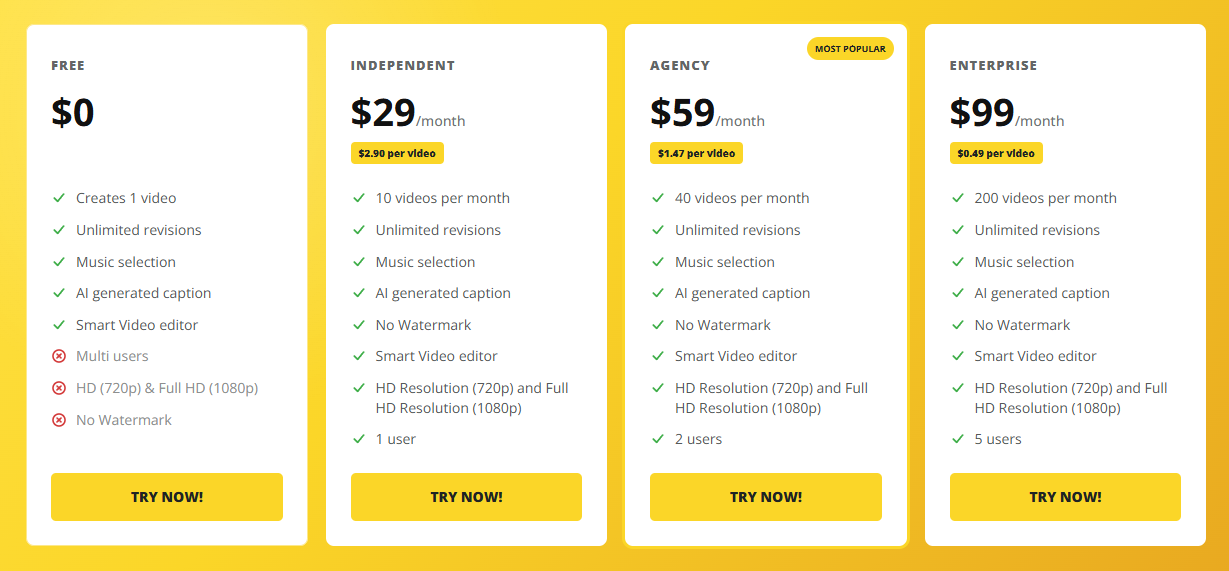
The published pricing page lists a free option and three paid tiers. The displayed subscription prices are as follows; confirm the current billing period and checkout total before subscribing.
| Plan | Published price | Monthly video allowance | Listed users |
|---|---|---|---|
| Free | $0 | 1 video | Multi-user access listed |
| Independent | $29/month | 10 videos | 1 |
| Agency | $59/month | 40 videos | 2 |
| Enterprise | $99/month | 200 videos | 5 |
The paid plans list unlimited revisions, music selection, AI-generated captions, a smart editor, HD and Full HD export, and no watermark. Each video can include up to 60 photos according to the pricing page.
The page also lists included AI animations and a monthly credit allowance. Some feature pages display prices as billed annually, so do not assume that a headline monthly equivalent is necessarily the amount charged for a single month of service. Check the billing selection before entering payment details.
The best plan depends on how many property videos you actually publish.
Free plan: Best for assessing the workflow and deciding whether the output suits your brand.
Independent: Designed for solo agents who regularly create videos but do not need multiple team seats.
Agency: More relevant to teams that manage multiple listings and want a shared production process.
Enterprise: Intended for users who need a larger monthly video allowance and more seats.
The advertised per-video price is calculated by dividing the subscription price by its full video allowance. It does not necessarily reflect the effective cost of your actual usage, especially if you leave videos unused or buy additional AI credits.
VideoTour.ai distinguishes between creating a basic listing video and adding optional AI-generated effects.
The published pricing information says standard listing videos can be created with included motion effects, while additional AI animation features use credits. The pricing page gives examples such as 10 credits for a photo animation and 20 credits for an animated logo introduction.
Some pages also describe different credit costs for higher-quality animations. Because the exact allowance and cost may depend on the selected plan and feature, confirm the current credit balance and cost before generating or regenerating an effect.
Credits can matter more than the headline subscription price if you want to animate many photos for every property.
It may be cheaper for producing photo-based marketing clips, particularly when you need a video for many listings. But the comparison is not one-to-one.
A videographer may capture real movement through a property, record original footage, and provide custom editing. VideoTour.ai works from photos and automates parts of the editing process.
A fair comparison should include:
The subscription and credit costs.
The number of videos actually produced.
The time needed to prepare photos and review the output.
Whether the result meets the listing's marketing requirements.
The value of original footage or customized production.
If you need a simple social media asset from existing photos, an AI tool may be sufficient. If the property demands a highly accurate, cinematic walkthrough, professional filming may still be the better option.
VideoTour.ai has an operating product website, published pricing, a help center, and terms of service identifying VideoTour AI LLC as the service provider.
These are useful signals when evaluating a software business, but they do not independently prove that every feature works as advertised or that every customer will be satisfied.
A more useful assessment looks at the platform's product fit, customer feedback, billing terms, and limitations.
VideoTour.ai publishes customer testimonials describing faster video production, easier editing, and more consistent listing marketing. Those testimonials are selected by the company, so they should be treated as promotional feedback rather than independent evidence.
The platform's own review page also includes customer comments about occasional imperfect renders, limitations on photo counts for some workflows, and the need to adjust animations when the AI changes details that should remain fixed.
These are practical considerations for a real estate marketing tool. Even a fast generation process may require a manual review and an occasional rerun.
Third-party website reputation checkers can produce conflicting results, and automated trust scores should not be treated as definitive proof that a company is legitimate or fraudulent. Review the company's legal terms, payment policies, support channels, and recent user feedback instead.
Legitimacy verdict: VideoTour.ai appears to be an identifiable software service with published terms and product documentation. The more relevant buying question is whether its output, pricing, and refund conditions suit your workflow.
This is one of the most important sections to read before paying.
VideoTour.ai's published Terms of Service state that subscription payments and AI credit-pack purchases are generally non-refundable once made, including when a customer is dissatisfied with a completed video.
The terms identify exceptions for billing errors, such as duplicate charges, and proven technical failures attributable to the company. The terms direct customers to contact support with the account email and charge details.
This means you should not interpret a free trial or free first video as evidence that a paid subscription is risk-free.
Before upgrading:
Create and review the free video.
Confirm that the available editing controls meet your needs.
Check the paid plan's exact video and AI-credit allowances.
Confirm whether the price shown is monthly or billed annually.
Read the current Terms of Service and refund terms.
Save a copy of the plan details and payment confirmation.
If a technical issue occurs, retain screenshots, project details, and relevant billing information before contacting support. Do not assume that unused credits or an unsatisfactory creative result automatically qualify for a refund.
Designed specifically for real estate property marketing.
Converts existing listing photos into video content.
Includes music selection, captions, and editing tools.
Offers a free starting video.
Paid plans include monthly video allowances and no-watermark exports.
Supports different aspect ratios for different publishing channels.
Can help agents and photographers standardize recurring video production.
AI-generated motion may distort or alter details in a property photo.
Photo-based videos are not a substitute for genuine walkthrough footage.
Optional AI animations can consume additional credits.
Paid subscriptions and credit packs are generally non-refundable under the published terms.
Actual value depends on how much of the monthly allowance you use.
Marketing testimonials do not guarantee improved engagement, leads, or sales.
Billing periods and plan details should be checked carefully at checkout.
Canva is a broad design and content-creation platform with video editing tools. VideoTour.ai is more specialized around turning property photos into listing videos.
| Consideration | VideoTour.ai | Canva |
|---|---|---|
| Main focus | AI property videos | General design and content creation |
| Starting material | Listing photos and property details | Images, video clips, templates, and other assets |
| Workflow | Property-video-oriented | Broad, flexible design workflow |
| AI photo motion | A central feature | Depends on available tools and current plan |
| Custom creative control | Focused on the listing-video workflow | Broad design and editing flexibility |
| Best fit | Repeatable property marketing videos | Broader marketing assets and customized designs |
Choose VideoTour.ai if you want a specialized listing-video workflow and prefer less manual assembly. Consider Canva if you need more flexibility across flyers, presentations, social posts, and other marketing materials.
The best choice depends on the final output you need, not just the number of AI features a platform advertises.
If VideoTour.ai does not match your workflow, compare alternatives by the type of content you need.
A useful option for agents who want property videos alongside listing flyers, social media posts, presentations, and other branded materials.
Worth evaluating if your priority is flexible video editing for short-form social content. It may require more manual editing to achieve a consistent property-listing workflow.
Consider it if you already use Adobe tools and need branded marketing content with video capabilities.
For premium listings, physically accurate walkthroughs, or custom cinematic storytelling, professional filming may offer something that photo-animation software cannot.
These are alternatives by use case, not a definitive ranking. Check current feature availability, licensing, pricing, and export requirements before choosing a platform.
VideoTour.ai is most relevant to real estate agents, brokerages, photographers, and property managers who produce listing content regularly.
It may be particularly useful when:
You already have high-quality property photos.
You want to publish a video for more listings without a separate filming session.
You need repeatable branding and a consistent workflow.
You can review AI-generated motion for accuracy.
You create enough videos to justify a monthly plan.
It may be less suitable if you create very few videos, require detailed real-world walkthrough footage, or need a highly customized edit for every property.