

Copying trades across multiple trading accounts can become complicated when those accounts use different brokers, trading platforms, or execution environments. Traders may also want to automate signal delivery, apply risk limits, or manage accounts without maintaining a separate virtual private server (VPS).
MetaCopier is designed to address these challenges with a cloud-based trade-copying platform that connects multiple trading systems and cryptocurrency exchanges. It also offers automation tools, account-management features, APIs, and hosting for MetaTrader Expert Advisors.
But is MetaCopier worth considering? The answer depends on your trading setup, the integrations you need, and how much control you want over your automated workflows.
This MetaCopier review examines its advertised features, pricing model, potential advantages, limitations, and the questions traders should resolve before connecting live accounts.
Editorial note: This review is based on publicly available product information and documentation. It does not claim independent hands-on testing, verified execution-speed measurements, or personal trading results. Features and prices may change.
MetaCopier is a cloud-based trade copier that replicates trades and related trading activity between supported platforms and accounts. Instead of relying entirely on locally installed software or a self-managed VPS, users can configure and manage their copying setup through the service's online interface.
The platform lists integrations across several categories, including:
Forex and CFD platforms: MetaTrader 4 (MT4), MetaTrader 5 (MT5), cTrader, DXtrade, TradeLocker, and MatchTrader.
Trading and brokerage platforms: TradingView, TradeStation, Tradovate, and Alpaca.
Cryptocurrency exchanges: Binance, Bybit, Bitget, OKX, Gate.io, Bitunix, BloFin, and Hyperliquid, among others.
Signal sources: Telegram signals and TradingView alerts.
The exact capabilities available for a particular integration may differ. Before signing up, confirm that your specific broker, account type, and intended master-to-follower direction are supported.
MetaCopier is primarily a trading infrastructure and automation tool. It does not, by itself, establish that a trading strategy is profitable or that copied trades will produce the same outcome across accounts.
A typical trade-copying setup has two roles:
Master account: The account or signal source that generates the trades.
Follower account: The account that receives and replicates those trades.
After connecting the relevant accounts, users configure how trades should be copied. Depending on the supported integration and settings, this may include position sizing, trade filters, account-specific rules, and risk controls.
For example, a trader might want to copy trades from an MT5 account to a second MT5 account at another broker, or distribute signals from a supported source to multiple follower accounts.
A cloud-based system can reduce the need to keep a personal computer running continuously. However, traders should still verify connection status, permissions, broker restrictions, and the behavior of the copier when an account disconnects or an order cannot be executed.
Important: Trade copying is not the same as guaranteed identical execution. Differences in spreads, liquidity, slippage, contract specifications, leverage, and broker execution rules can cause follower accounts to produce different results.
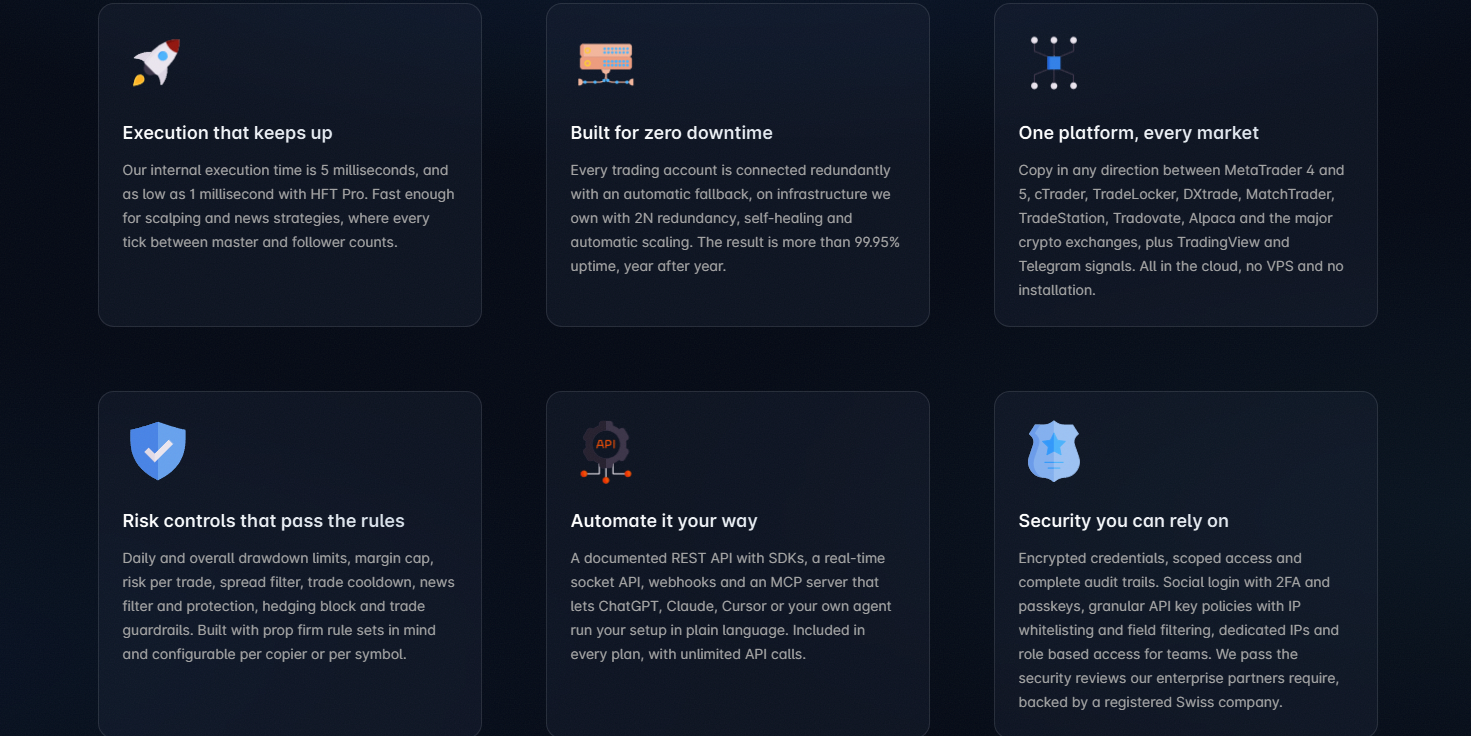
One of MetaCopier's main selling points is that its copying infrastructure runs in the cloud. The company says users can manage their setup through a browser without maintaining their own VPS for the copying service.
This may be useful for traders managing several accounts or running automation outside normal working hours.
Potential benefits include:
Less server maintenance for the user.
Centralized account and project management.
Access through a browser on supported devices.
A cloud environment for trade-copying workflows.
Cloud hosting does not eliminate every operational risk. Internet connectivity at the broker, platform permissions, service interruptions, and exchange-specific restrictions can still affect execution.
MetaCopier advertises connections between several traditional trading platforms and crypto exchanges. This is potentially valuable for traders whose accounts are spread across different systems.
Before committing, verify three details:
Whether both your source and destination platforms are supported.
Whether the precise copying direction is available.
Whether your required order types, symbols, and account modes are compatible.
A platform appearing on an integration list does not necessarily mean every feature works identically across all account types.
MetaCopier documents multiple controls intended to help users manage copied trades and account exposure. Depending on the configuration and available features, these include daily drawdown limits, maximum trade sizes, limits on open trades, spread filters, risk-per-trade settings, margin caps, and news-related protections.
These tools can help traders enforce predefined rules, but they should not be treated as a guarantee against losses.
For example, a drawdown limit may behave differently depending on how the reference balance, equity, open positions, and reset period are configured. Users should understand the trigger conditions and what the system does when a limit is reached.
Best practice: Test risk controls with a small, controlled setup and review the documentation before enabling them on a funded or live account.
MetaCopier supports workflows that connect trading signals to account execution. Its Telegram connector is described as using AI-assisted parsing to interpret supported signal messages, including information such as direction, volume, stop loss, and take profit.
The platform also advertises TradingView webhook integration.
These features may appeal to traders who receive signals from communities, channels, or custom alert systems. However, automated interpretation can still fail when a message is ambiguous, outdated, formatted unexpectedly, or refers to a symbol that differs from the broker's naming convention.
Before relying on automated signals, check whether the system allows confidence thresholds, symbol mappings, stale-signal filters, and appropriate safeguards against duplicate or unintended trades.
MetaCopier also advertises cloud hosting for MT4 and MT5 Expert Advisors (EAs). Users can upload supported EA files and associated resources, select the relevant chart configuration, and monitor status and logs.
This could be useful if you want to run an EA without separately maintaining a VPS.
The published pricing information lists EA hosting at $0.23 per hosted expert per day. Confirm the current rate and any account, resource, or file restrictions before deploying a strategy.
For developers and advanced users, MetaCopier lists REST API access, SDKs, a real-time socket API, webhooks, and an MCP server for connecting compatible AI assistants.
These capabilities may support custom dashboards, workflow automation, account monitoring, or natural-language interaction with supported account-management functions.
API access is most relevant to users who need more than a standard point-and-click trade copier. If you intend to automate actions that can place, modify, or close trades, carefully review access permissions and keep write access disabled until you have tested the workflow and understand its consequences.
MetaCopier describes its standard model as usage-based billing rather than a conventional fixed monthly subscription. Charges are calculated per account and by the number of days the account remains active.
The documentation lists the following pricing for shared projects:
| Item | Published price |
|---|---|
| Shared project account | $0.27 per account per day |
| New-user trial credit | $20 |
| Dedicated IP | $6 per month |
| Pro features | Additional $0.10 per day per account using them |
| EA hosting | $0.23 per hosted expert per day |
These are published reference prices, not a guarantee that every configuration will cost the same. Check the current billing documentation and your dashboard's cost forecast before adding accounts or optional features.
At the published rate of $0.27 per account per day, an account active for 30 days would cost approximately $8.10 before optional add-ons.
| Active accounts | Approximate 30-day base cost |
|---|---|
| 1 | $8.10 |
| 5 | $40.50 |
| 10 | $81.00 |
| 20 | $162.00 |
These examples use a simple calculation of $0.27 × 30 days × active accounts. They exclude Pro features, dedicated IPs, hosted EAs, taxes, and other potential charges. They also assume the shared-project rate remains unchanged.
Dedicated projects use a different pricing structure. The documentation describes a minimum package of 25 accounts per project and region, so this option may be less economical for users with only a few accounts.
MetaCopier advertises a $20 credit for new users to explore the service. The FAQ also states that trial users are limited to 10 accounts unless the project is funded with $50 or an equivalent amount.
A trial credit can be helpful because it allows users to explore the service before committing to ongoing usage. However, a credit is not the same as a money-back guarantee.
The company's FAQ says it does not offer refunds or a money-back guarantee. It also warns that billing begins when an account is added and continues until that account is removed—even if no copier is active.
Before starting a trial, confirm:
Which features and account types the credit covers.
Whether any usage can exceed the available credit.
Whether added accounts start accruing charges immediately.
How to remove accounts and stop further billing.
Whether optional Pro features or dedicated IPs are enabled.
These details matter more than the headline trial amount when estimating the actual cost of a setup.
Broad integration list: Supports a range of trading platforms and crypto exchanges.
Cloud-based workflow: Reduces the need to manage a separate VPS for the copier.
Usage-based pricing: Shared-project costs are based on active account-days rather than a single mandatory flat subscription.
Configurable controls: Offers documented tools for managing exposure, trade sizing, and other copying rules.
Automation options: Includes signal connectors, APIs, webhooks, and EA hosting.
Trial credit: Provides a way to explore the platform before paying beyond the credit.
Costs can accumulate: Each active account can incur charges even when no copier is running.
No stated money-back guarantee: The published FAQ says refunds are not offered.
Setup complexity: Multi-platform automation may require technical knowledge and careful configuration.
Execution is not guaranteed to match: Broker and market differences can affect copied results.
Integration compatibility needs checking: Support for a platform does not guarantee every account mode or order type is compatible.
Marketing claims need independent validation: Advertised latency and uptime figures should not be treated as independently verified performance results.
MetaCopier's website identifies the business as Mirala GmbH, registered in Switzerland, and publishes company contact information. It also provides product documentation covering billing, integrations, and feature configuration.
These are useful transparency signals, but they do not independently prove that the service is risk-free, that every advertised performance claim has been independently verified, or that it is suitable for every trader.
Public review data should also be interpreted carefully. At the time of research, Trustpilot displayed a score of 3.9 out of 5 based on only three reviews. Such a small sample is insufficient to establish broad customer satisfaction or predict your own experience.
Before connecting a live trading account, consider the following checks:
Confirm the legal entity and support contact details.
Read the billing, refund, and account-removal terms.
Verify the integrations you intend to use.
Review credential handling and account permissions.
Test copying with a small, controlled setup.
Monitor order execution, rejected trades, and account differences.
Avoid granting more access than your workflow requires.
The reasonable conclusion is that MetaCopier is a real, documented software offering with a broad advertised feature set. That is different from concluding that it is risk-free or that its trading performance has been independently proven.
There are two separate questions: whether the software provides appropriate account and access controls, and whether the trading strategy itself is financially safe.
MetaCopier documents security-related features such as encrypted credentials, scoped access, two-factor authentication options, passkeys, API access policies, and audit trails. Prospective users should review the current security documentation and determine which controls apply to their specific connection.
Trading risk remains even when the software operates as intended. A copier can replicate losing trades just as efficiently as winning trades. Automated execution can also amplify mistakes across several accounts.
For better operational control:
Start with a demo or low-risk account when possible.
Use limited permissions and protect API credentials.
Set account-specific risk limits.
Monitor follower accounts instead of assuming every order was copied correctly.
Test what happens during disconnections, rejected orders, and high-volatility periods.
Keep enough margin for the strategy and account rules you actually use.
No trade copier can guarantee profits, eliminate market risk, or ensure identical fills across brokers.
MetaCopier may be worth evaluating if you:
Manage multiple trading accounts.
Need to copy trades between supported platforms.
Run a strategy that depends on automated execution.
Distribute signals to follower accounts.
Need APIs or webhooks for custom integrations.
Want to host supported MetaTrader EAs in the cloud.
Prefer usage-based billing and can monitor account-level costs.
It may be less suitable if you trade only one account manually, want a completely free service, need a guaranteed fixed monthly bill, or are uncomfortable configuring automated trading systems.
Beginners should be especially cautious about connecting live accounts before they understand order sizing, leverage, margin, and the consequences of copying a trade to several accounts simultaneously.
The best alternative depends on your trading platforms and the problem you are trying to solve. Compare providers using the same criteria rather than choosing solely by advertised speed or the number of integrations.
Consider evaluating:
Platform-native tools: Check whether your broker or trading platform already offers the copying or automation function you need.
Other trade copiers: Compare supported master/follower combinations, risk controls, billing models, and account-removal procedures.
Signal automation tools: If your main requirement is distributing alerts, compare signal-routing solutions rather than paying for a broad multi-platform infrastructure.
A self-managed VPS and EA setup: This may suit technically experienced MT4/MT5 users who prefer to control their own hosting, but it introduces maintenance and monitoring responsibilities.
Before choosing an alternative, compare the total cost of the same number of accounts over the same number of days. Include optional features, hosting, and any minimum account packages.