

Keeping in touch with people sounds simple until your network grows. A former colleague changes jobs, a promising professional contact gets buried in your inbox, and a conversation you meant to follow up on slips your mind.
Dex is designed to help prevent those situations. It is a personal relationship manager, or personal CRM, that brings contacts and interaction context together, syncs with selected apps, and reminds you when it may be time to reconnect.
Unlike a conventional sales CRM, Dex is not primarily built around deals, revenue forecasts, or sales pipelines. Its focus is the people in your network and the relationships you want to maintain.
But is Dex worth paying for? That depends on how many relationships you actively manage, how well its integrations fit your existing workflow, and whether its reminders become a useful habit or another notification to ignore.
This Dex review examines the product's published features, pricing, integrations, privacy information, and available user feedback. It does not claim independent hands-on testing.
Dex is worth considering if you have a growing network and want a structured way to remember people, record context, and follow up consistently.
Its main advantage is that it brings contact information and relationship history into one place. Rather than maintaining a separate spreadsheet, you can use supported integrations to sync contacts and selected activity from services such as LinkedIn, Gmail, calendars, and messaging platforms.
Dex is particularly relevant to founders, job seekers, recruiters, investors, consultants, and people who rely on networking to build professional opportunities.
Dex may be a good fit if you:
Regularly meet new professional contacts.
Want reminders to reconnect with people.
Need to remember notes and details from previous conversations.
Use LinkedIn, email, calendars, or messaging apps to maintain relationships.
Prefer a personal CRM over a complex sales CRM.
It may be less suitable if you:
Only need a basic address book.
Want a full sales pipeline with deals, forecasting, and advanced reporting.
Prefer a completely free tool with no paid subscription.
Do not want to connect your email, calendar, or social accounts.
Struggle to maintain any recurring contact-management habit.
Verdict: Dex offers a focused approach to personal relationship management. Its value depends less on how many contacts you can import and more on whether it helps you maintain meaningful relationships consistently.
CTA: Explore Dex's features and test the contact workflow during the free trial before committing to a paid plan.
Dex is a personal CRM designed to help users organize their network and remember important interactions. The company describes it as a modern digital rolodex rather than a traditional sales CRM.
The platform can combine contact information from supported sources, organize people with notes and custom fields, and help users keep track of when they last connected.
For example, a founder might use Dex to remember conversations with investors. A job seeker could track former colleagues and hiring managers. A consultant might use it to stay connected with clients and professional contacts after a project ends.
The central idea is straightforward: relationships often become difficult to maintain because information is spread across several applications. Dex aims to reduce that fragmentation.
It is important to distinguish this use case from sales automation. A personal CRM helps you remember and manage relationships; a sales CRM typically adds structured pipelines, deal stages, forecasting, and team-based reporting. Dex explicitly positions itself outside the traditional sales-CRM category.
Dex's workflow centers on consolidating contacts, recording context, and reminding you to follow up.
Dex supports contact imports and integrations involving sources such as LinkedIn, email accounts, calendars, phone contacts, and other services.
The goal is to reduce manual data entry and make it easier to maintain a consolidated contact database.
However, not every integration necessarily supports the same operations. Some may import contact details, while others may synchronize selected activity or updates. Check the current integration documentation for the exact permissions and capabilities you need.
Dex lets users organize contacts with notes, groups, tags, custom fields, and views.
This is useful when you want more context than a name, email address, and phone number. You might record where you met someone, what you discussed, a shared interest, or a topic to revisit in your next conversation.
The quality of that information still depends on how consistently you maintain it. Automated syncing can reduce some manual work, but it cannot guarantee that every important detail will be captured correctly.
Dex integrates with selected communication and calendar tools to help surface interaction history and context.
That can make a follow-up more informed. Instead of sending a generic message, you may be able to review a previous conversation or meeting before reaching out.
Before connecting your accounts, confirm which messages, contacts, calendar details, or other information Dex accesses. Syncing capabilities and privacy implications vary by integration.
One of Dex's central features is the ability to set reminders to keep in touch with contacts.
This is especially useful for people who manage relationships over months or years rather than through a short sales cycle. You can create a routine for checking in with former colleagues, mentors, clients, or other important contacts.
The challenge is making the reminders manageable. If you import hundreds of contacts without prioritizing them, you may create an overwhelming list instead of a useful system.
Start with a smaller group of relationships and set realistic follow-up intervals.
Dex lists mobile, browser extension, web, and desktop access on its paid plans. This can help users update contact details or review relationship context in different situations.
The available features may vary by platform. Check the current plan details if you depend on a specific device or browser workflow.
Dex consolidates contacts and provides tools for organizing people and their details. For someone whose network is spread across social platforms, email, and phone contacts, this can be more useful than keeping separate lists.
Its advantage is not simply storing names. The value comes from associating people with notes, interactions, reminders, and relevant context.
The main limitation is that a contact database requires maintenance. Duplicate records, outdated information, and incomplete notes can still reduce its usefulness.
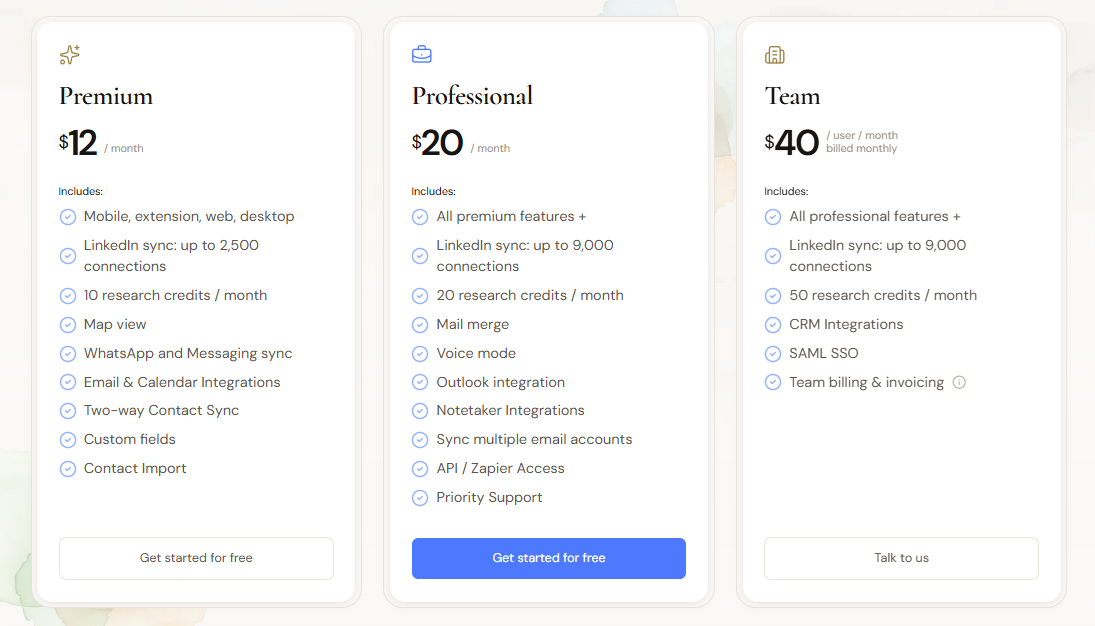
Dex supports LinkedIn syncing through its browser extension. The published pricing page lists a limit of up to 2,500 connections for Premium and up to 9,000 for Professional and the higher-tier plan.
This can be useful for founders, recruiters, job seekers, and other professionals who build much of their network through LinkedIn.
Before subscribing, check the current connection limit and what happens if your network exceeds it. Also verify which information is synchronized and how updates are handled.
Dex supports integrations involving Gmail, Google Calendar, Outlook, and other communication tools, with some features varying by plan.
Email and calendar context can help answer practical questions such as when you last spoke to a contact or which meeting you attended together.
The trade-off is data access. Email and calendar accounts may contain sensitive personal and professional information, so it is worth reviewing the requested permissions before connecting them.
Dex advertises WhatsApp and messaging synchronization. The precise capabilities depend on the supported integration and platform.
For people who communicate through several channels, bringing selected interaction context into a personal CRM may reduce the need to remember which app contains a conversation.
Do not assume that every message, attachment, or group conversation will be imported. Verify the current documentation and test with a small number of contacts before relying on the integration.
Dex supports notes and custom ways to organize contacts. These features are important because the same relationship system can serve different purposes for different users.
For example:
A job seeker could group hiring managers, recruiters, mentors, and former colleagues.
A founder could organize investors, advisors, customers, and potential partners.
A consultant could separate current clients, former clients, collaborators, and referral sources.
The best structure is one that makes it easy to find information and decide whom to contact next. Overcomplicating tags and fields can make the system harder to maintain.
Dex includes a research feature that can prepare a briefing about a contact, including background, current role, and changes since the last interaction. The published plans list different monthly research-credit allowances.
Premium includes 10 research credits per month, Professional includes 20, and the higher-tier offering lists 50. Confirm the current plan names and allowances before subscribing.
Research credits are a separate consideration from contact storage. If you frequently prepare for meetings or networking conversations, this feature may be useful. If you only need reminders and notes, you may not need to pay for a higher allowance.
Dex offers paid subscriptions with different feature and usage limits. Its pricing page advertises annual, quarterly, and monthly billing options, with discounts for longer commitments.
The current published pricing page lists these monthly-equivalent prices:
| Plan | Advertised price | Notable features |
|---|---|---|
| Premium | $12/month | Core contact management, mobile/web/desktop access, LinkedIn sync up to 2,500 connections, 10 research credits/month |
| Professional | $20/month | Premium features plus higher LinkedIn limit, 20 research credits/month, mail merge, voice mode, multiple email accounts, API/Zapier access |
| Enterprise | Custom | CRM and notetaker integrations, 50 research credits/month, SAML SSO, SOC 2 report, team billing |
These are the prices displayed on the official pricing page, not a guarantee of the amount charged for every billing option. Monthly billing can cost more than the monthly equivalent of an annual subscription. Check the selected billing cycle and checkout amount before paying.
The company's support page also describes a Team offering at $40 per user per month, billed monthly. Because the public pages may differ in how they label or present higher-tier plans, verify the current team pricing directly with Dex if you need multiple seats.
That depends on the value of the relationships you manage and the time the tool saves.
For an occasional networker with a few dozen important contacts, a phone address book and calendar reminders may be enough. A paid personal CRM becomes more attractive when you manage a large network, need cross-platform synchronization, or frequently prepare for meetings and follow-ups.
A practical way to assess the price is to ask:
How many contacts do I actively maintain?
How much time do I spend finding old conversations and notes?
Will reminders help me follow up more consistently?
Do I need the paid integrations or research credits?
Would a spreadsheet or simpler contact manager meet the same need?
If you mainly need contact storage, paying for research credits, advanced integrations, and additional tools may not be worthwhile. If relationship management is central to your work, those features may justify the subscription.
Dex offers a 7-day free trial for Premium and Professional. The official pricing information states that a credit card is required to start the trial.
This is a trial of paid features, not an unrestricted permanent free plan.
Dex's getting-started documentation says the trial converts automatically at the end of the seven-day period. The plan and billing cycle selected during signup determine the charge, and there is no additional confirmation step at the end.
That means choosing annual billing at signup can result in an annual charge when the trial ends if you do not cancel in time.
If you want to test Dex without committing:
Check the selected plan and billing frequency during signup.
Note the exact trial end date.
Set a reminder a day or two before the deadline.
Cancel through the account's billing settings before the trial ends if you do not want to continue.
Retain the cancellation confirmation.
Do not assume the trial will end without a charge simply because you have not actively used the product.
Dex has an official website, published pricing, product documentation, support information, and mobile app listings under Dana HQ, Inc. These are useful signs of an identifiable software service.
However, legitimacy and suitability are different questions. A functioning app may still have limitations, and a positive rating does not guarantee that its workflow will fit your needs.
Dex has reviews on app marketplaces and third-party software review sites. Feedback includes positive reports about its relationship-management features, contact organization, and ability to keep a professional network accessible.
There are also critical reviews. For example, a Google Play reviewer described frustration with how the app handled contacts after marking an interaction as completed. This highlights an important product-fit question: reminders are only useful if the workflow behaves in a way that matches how you manage relationships.
The Google Play listing showed a 3.7-star rating from 281 reviews in the search result available for this review. Ratings can change, and app-store reviews are individual experiences rather than controlled product tests.
When evaluating reviews, look for repeated themes about syncing, reminders, app stability, data accuracy, and customer support rather than relying on a single rating.
Legitimacy verdict: Dex appears to be an established personal CRM product, but its usefulness depends on the reliability of its contact-syncing and reminder workflows. Test those core features during the trial rather than judging only by the feature list.
A personal CRM can hold a surprisingly detailed picture of your life. Contact details, notes, professional relationships, calendar activity, and communication history may all be sensitive.
Dex says it does not sell or share user data with third parties. Its public privacy and security information should be reviewed alongside the permissions requested by each integration.
The Apple App Store privacy disclosure for Dex indicates that data linked to users may include contact information, contacts, and usage data. Apple also notes that these disclosures are supplied by the developer and are not verified by Apple. That is not automatically evidence of a problem, but it reinforces the need to understand what data the app handles.
Contact access: Determine which contacts are imported and whether changes sync back to your phone or other services.
Email permissions: Check whether Dex accesses message content, sender information, or other email data, and understand how that information is used.
Calendar permissions: Review which events and attendee details are accessed.
Social integrations: Verify which LinkedIn or messaging information is synchronized and whether any action is taken on your behalf.
Data deletion: Read the current policy to understand how to export or delete your data if you stop using Dex.
Account security: Use a strong password and any supported account-security features.
Dex's privacy positioning may appeal to users who want control over their relationship data, but no software should be granted more access than its intended workflow requires. Start with the integrations you actually need and review the permissions carefully.
Focuses on personal relationships rather than sales pipelines.
Helps organize contacts, notes, tags, and reminders.
Integrates with selected email, calendar, social, and messaging services.
Offers mobile, web, desktop, and browser-extension access.
Supports LinkedIn synchronization with plan-specific limits.
Includes research credits for contact briefings on paid plans.
Can help professionals maintain context across a growing network.
Paid plans may be unnecessary for people with simple contact-management needs.
Premium and Professional require a payment card for the seven-day trial.
The trial automatically converts unless cancelled.
Some advanced features and higher contact limits require a more expensive plan.
Integration permissions deserve careful review because the app may handle sensitive relationship data.
User feedback indicates that some workflows may not behave as every user expects.
It is not designed to replace a full sales CRM with pipeline management and forecasting.
Dex and HubSpot serve different primary purposes.
Dex is built for personal relationship management: remembering people, keeping notes, and following up with contacts. HubSpot is a broader customer platform with CRM capabilities for businesses that manage leads, deals, marketing, sales activity, and customer relationships.
| Consideration | Dex | HubSpot |
|---|---|---|
| Primary purpose | Personal relationship management | Business CRM and customer management |
| Relationship reminders | Core use case | Available within broader CRM workflows |
| Sales pipelines | Not the main focus | Central to sales CRM functionality |
| Personal networking | Strong fit | May be more complex than necessary |
| Team sales processes | Limited relative to a full sales CRM | Better suited to structured team processes |
| Best fit | Individuals maintaining a network | Businesses managing leads and customers |
Choose Dex if your main problem is remembering people and maintaining relationships. Consider HubSpot if you need a structured sales process, shared customer records, pipeline reporting, and team workflows.
Dex and Clay can both help users manage contacts, but they emphasize different parts of the workflow.
Dex focuses on maintaining relationships over time. Clay is commonly associated with contact enrichment, research, and data-driven workflows, particularly in professional networking and sales contexts.
If you want reminders, relationship notes, and an organized personal network, Dex may be the more direct fit. If your priority is researching and enriching large numbers of contacts, compare Clay's current capabilities and pricing against your workflow.
The right choice depends on whether your main challenge is maintaining relationships or gathering and processing contact data.
Notion is a flexible workspace where users can build custom databases for contacts, notes, projects, and follow-ups. Dex is more specialized for contact syncing and relationship management.
| Consideration | Dex | Notion |
|---|---|---|
| Setup | Purpose-built contact workflow | Custom database may need configuration |
| Contact synchronization | Supported integrations | Depends on integrations and setup |
| Relationship reminders | Core feature | Can be configured with databases and reminders |
| Flexibility | Focused on personal CRM | Broad workspace and database flexibility |
| Best fit | Users who want a ready-made relationship tool | Users who want to build a customized system |
If you already maintain an effective contact database in Notion, moving to Dex may not be necessary. If your current system requires too much manual maintenance, Dex's integrations and dedicated reminders may justify a trial.
If Dex does not fit your workflow, consider alternatives based on the problem you need to solve.
Worth evaluating if you want a personal relationship manager with an emphasis on remembering personal details and maintaining connections. Compare its current hosting options, pricing, and data-control model with your needs.
Consider it if you want a contact-management tool focused on strengthening relationships and keeping contact information organized. Check its current integrations and reminder options.
Worth evaluating if your workflow involves contact research, enrichment, and building a more data-driven professional network.
A good starting point if you prefer a flexible, customizable contact database and are comfortable configuring your own fields and workflows.
Consider it when your needs go beyond personal networking and include team-based sales pipelines, lead management, and customer reporting.
These alternatives serve different use cases. Compare the current feature sets and pricing rather than assuming one is universally better.
Dex is most relevant to people whose work or personal goals depend on maintaining relationships over time.
It may be useful for:
Founders: Keep track of investors, advisors, customers, and potential partners.
Job seekers: Organize former colleagues, recruiters, hiring managers, and mentors.
Recruiters: Maintain context around candidates and professional connections, subject to appropriate data-handling practices.
Investors: Remember conversations and follow up with founders or other contacts.
Consultants: Stay connected with current and former clients.
Networkers and community builders: Remember how they met people and when they last connected.
Dex may be unnecessary for someone who rarely needs to follow up with contacts or whose existing phone address book already meets their needs.